
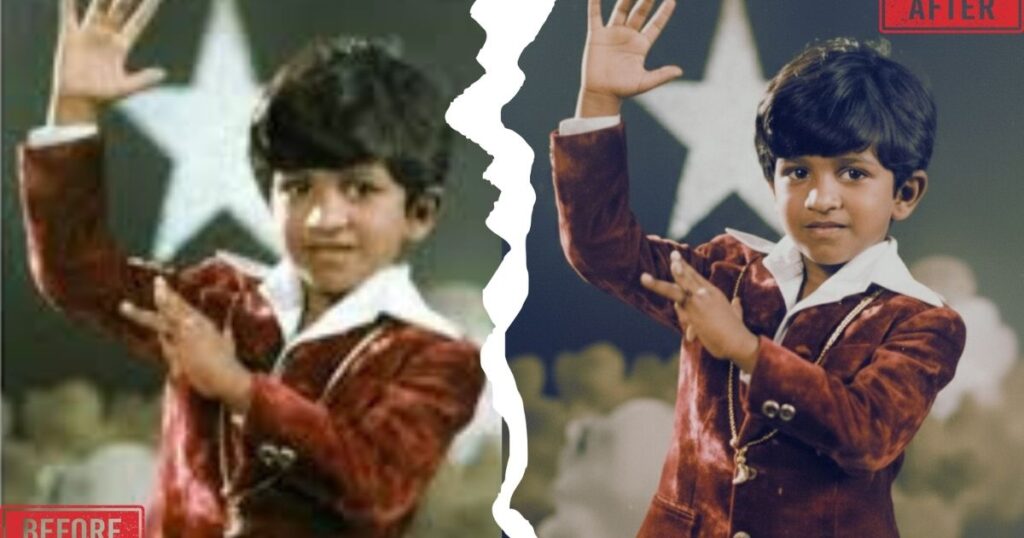
Old photos often carry priceless memories, but over time they can fade, lose clarity, or suffer from scratches and damage. This is where a powerful Photo Enhancer Prompt can make a huge difference. With the help of modern AI tools like Google Gemini, it is now possible to restore old photographs while keeping the person’s original identity and facial details intact.
A well-structured Photo Enhancer Prompt guides the AI to improve image quality without altering important elements such as facial features, expressions, or unique characteristics. Instead of generating a completely new image, the AI focuses on restoring sharpness, repairing damaged areas, enhancing lighting, and improving overall resolution while preserving the authenticity of the original photo.
Many people worry that AI restoration might change the face or identity of the person in the photo. However, when you use the right Photo Enhancer Prompt, the AI enhancement process becomes much more controlled and accurate. It ensures that the image looks clearer, cleaner, and more detailed while maintaining the true appearance of the subject.
In this guide, you’ll learn the ultimate Photo Enhancer Prompt for Google Gemini that can help you restore old photos professionally. This prompt is designed to repair damage, enhance resolution, and improve visual quality while keeping the original identity completely unchanged.
This prompt does NOT:
- Change the face
- Alter proportions
- Modify expression
- Replace backgrounds
- Add artificial beauty filters
Instead, it performs professional-grade restoration while keeping the subject unmistakably the same person.
Examples :


Why Most AI Photo Enhancers Fail
Many AI tools accidentally:
- Morph facial features
- Smooth skin excessively
- Replace backgrounds
- Change lighting direction
- Modify pose or framing
This destroys authenticity — especially in emotional family album photographs.
A proper Photo Enhancer Prompt must clearly instruct the AI to preserve:
Also read: Best Gemini Photo Prompts for Cinematic Indian Spiritual Portraits
- Identity
- Face shape
- Proportions
- Expression
- Pose
- Background
- Lighting direction
The prompt below enforces strict identity protection while upgrading quality to cinematic full-frame standards.
Professional Photo Enhancer Prompt for Google Gemini
Restore and enhance the old album photograph while strictly preserving the subject’s identity, accurate facial geometry, and original expression. Do not alter face shape, proportions, pose, or emotional expression. The person must remain unmistakably the same individual.
Perform professional photo restoration only: repair fading, discoloration, scratches, dust, creases, film damage, and age-related noise. Recover lost details naturally without oversmoothing. Maintain real skin texture, natural hair detail, and authentic fabric texture.
Keep the exact same background from the original image. No replacements, no changes, no additions, no removals, and no layout shifts. The environment must remain identical and untouched.
Recreate the image as if it were professionally re-photographed using a Sony A1 full-frame camera with an 85mm f1.4 lens, shot at f1.6, ISO 100, 1/200 shutter speed, with cinematic shallow depth of field, perfect facial focus, and an editorial-neutral color profile. This Sony A1 + 85mm f1.4 setup is mandatory, and the final image must clearly reflect premium full-frame Sony A1 quality.
Match the original lighting direction, angle, and mood exactly. Subtly upgrade the lighting into a cinematic, subject-focused style with soft directional light, warm highlights, cool shadows, deeper contrast, expanded dynamic range, smooth tonal transitions, and micro-contrast enhancement. No harsh or artificial lighting.
Maintain neutral premium color tones, a cinematic contrast curve, natural saturation, real skin texture (not plastic), subtle film grain consistent with archival restoration, and zero artificial glow.
Render in 4K resolution, 10-bit color, cinematic editorial style, premium clarity, and preserved portrait framing. Improve realism, depth, texture, and clarity while keeping identity, pose, expression, background, and original nostalgic atmosphere fully preserved.
NEGATIVE PROMPT:
No new background, no background changes, no dramatic lighting, no face morphing, no beautification, no fake glow, no flat lighting, no oversmoothing, no pose changes, no framing changes
Also read: 9 Insane Cinematic Viral AI Image Prompts That Create Blockbuster-Level Visuals
Or download the prompt pdf here
What Makes This Photo Enhancer Prompt Powerful
This isn’t a basic “enhance photo” instruction.
It includes:
1️⃣ Identity Lock Instructions
Prevents: Face reshaping, Jawline alteration, Eye resizing, Expression changes
2️⃣ Professional Restoration Commands
Also read: 2 Powerful Hindu God AI Image Prompts for Realistic Cinematic Portraits (Shiva & Hanuman)
Targets: Film grain damage, Dust & scratches, Discoloration, Fading, Creases
3️⃣ Premium Camera Simulation
Specifying: Sony A1, 85mm f1.4 lens, f1.6 aperture, ISO 100, 1/200 shutter
This tells Gemini to simulate full-frame realism with natural depth and professional sharpness.
4️⃣ Cinematic Lighting Upgrade
Instead of replacing lighting, it enhances: Contrast depth, Dynamic range, Micro-contrast, Tonal transitions
Without making it look artificial.
Why Sony A1 + 85mm f1.4 Works for Restoration
The 85mm focal length is ideal for portraits because:
- It avoids facial distortion
- Maintains natural compression
- Creates cinematic background separation
- Preserves proportions
Also read: Powerful Tamil Cinema Poster Design Prompt for Google Gemini (Cinematic 4K Style)
By specifying this setup, your photo enhancer prompt guides Gemini toward realistic portrait physics.
How to Use This Prompt in Google Gemini
- Open Google Gemini.
- Upload your old album photo.
- Paste the full restoration prompt.
- Generate.
- Review for identity accuracy.
- Regenerate if needed (never shorten the prompt).
Pro Tip: Do not remove the negative prompt section. It prevents AI hallucination.
Best Use Cases for This Photo Enhancer Prompt
This works perfectly for:
- Old family album photos
- Vintage black and white portraits
- Wedding album restoration
- Childhood photos
- Studio portraits from the 1990s
- Film camera images
It is especially powerful for sentimental images where identity preservation is critical.
Common Mistakes to Avoid
- ❌ Using short “enhance photo” prompts
- ❌ Forgetting to restrict background changes
- ❌ Allowing beautification filters
- ❌ Over-smoothing skin
- ❌ Using vague lighting instructions
Detailed prompts produce consistent results.
FAQ – Photo Enhancer Prompt
What is a Photo Enhancer Prompt?
A structured AI instruction that restores and improves old photos while preserving identity and realism.
Will this change the person’s face?
No. The prompt strictly locks facial geometry and expression.
Can it restore black and white photos?
Yes. It repairs damage while maintaining tonal authenticity.
Does it replace the background?
No. The prompt explicitly prevents background modification.
Why add camera specifications?
Camera simulation improves realism and portrait depth physics.
Final Thoughts
A proper Photo Enhancer Prompt is not about making someone look different — it’s about restoring memories without rewriting them.
This Google Gemini restoration prompt:
- Preserves identity
- Repairs real damage
- Maintains nostalgia
- Enhances clarity
- Adds cinematic depth
- Avoids artificial filters

Free Website Audit Prompts to Rank #1 on Google
If your website isn’t ranking on Google, chances are your SEO audit is missing something…

Free YouTube Title Generator for Viral High-CTR Titles
Looking for viral YouTube titles that actually get clicks? You’re in the right place. Our…

Creative Logo Prompts Designers Must Try in 2026
If you’re struggling to create unique and eye-catching logos, Creative Logo Prompts can completely transform…
Viral Editorial Photography Prompts for Midjourney
Creating stunning, magazine-quality visuals is no longer limited to professional photographers. With Editorial Photography Prompts,…

Top Faceless YouTube Channel Ideas to Start Today
🚀 Faceless YouTube channels are exploding right now—and for good reason. You don’t need a…
Copy-Paste Midjourney Prompts for Pro Photography
Want to create stunning, professional-quality photos using AI—without a camera? You’re in the right place….
Pingback: Best Trending AI Prompts 2026 for Viral Instagram Art - promptsadda