

You’ve got the footage, the passion, and the research. But that blank page? It’s staring back like a judgmental owl.
I’ve been there. Spent three weeks researching a documentary about abandoned subway systems, only to freeze when it came time to actually write the script. The words felt stiff.
The transitions clunky. And honestly? I was ready to scrap the whole thing.
Then I discovered something that changed my entire workflow: AI prompts for YouTube documentary scripts.
But here’s the catch: I learned the hard way that most people use AI completely wrong. They type “write me a documentary script” and get generic garbage. Then they blame the tool.
The problem isn’t the AI. It’s the prompt.
In this Article, I’ll show you exactly how to craft prompts that produce engaging, cinematic, human-sounding documentary scripts. No fluff. No theory you’ll never use. Just practical strategies I’ve tested across 40+ YouTube documentaries.
What Are AI Prompts for YouTube Documentary Scripts?
Let me break this down simply.
An AI prompt is just a set of instructions you give to an AI tool (like ChatGPT, Claude, or Gemini) to generate script content. But here’s what most YouTubers miss: a good prompt isn’t a question. It’s a creative brief.
Think of it like hiring a junior writer. You wouldn’t say “write something about World War II” and expect gold. You’d give them:
- The tone (cinematic? educational? suspenseful?)
- The structure (hook first? timeline format?)
- The audience (history buffs? casual viewers?)
- The length (8 minutes? 20 minutes?)
- Examples of what you like
That’s exactly what a strong AI prompt does. When you get it right, the AI becomes your brainstorming partner, research assistant, and first-draft writer all in one.

Why This Matters for Your Channel (Real Talk)
Here’s what I’ve learned after burning out twice on scriptwriting:
The old way was to research for days, outline for hours, and write painfully slow works. But it’s not sustainable if you want to post weekly. Or monthly, honestly.
The AI-assisted way using smart prompts to generate structure, narration, transitions, and even B-roll suggestions cuts my script time by about 60%. And here’s the part that surprised me: the quality went up, not down.
Why? Because AI handles the heavy lifting of phrasing and flow while I focus on what actually matters: the story, the emotion, the unique angle.
But again, this only works if you know how to prompt correctly. Let me show you.
The Anatomy of a Killer Documentary Script Prompt
After testing hundreds of variations, I’ve landed on a formula that consistently works. I call it the C.A.S.T. framework:
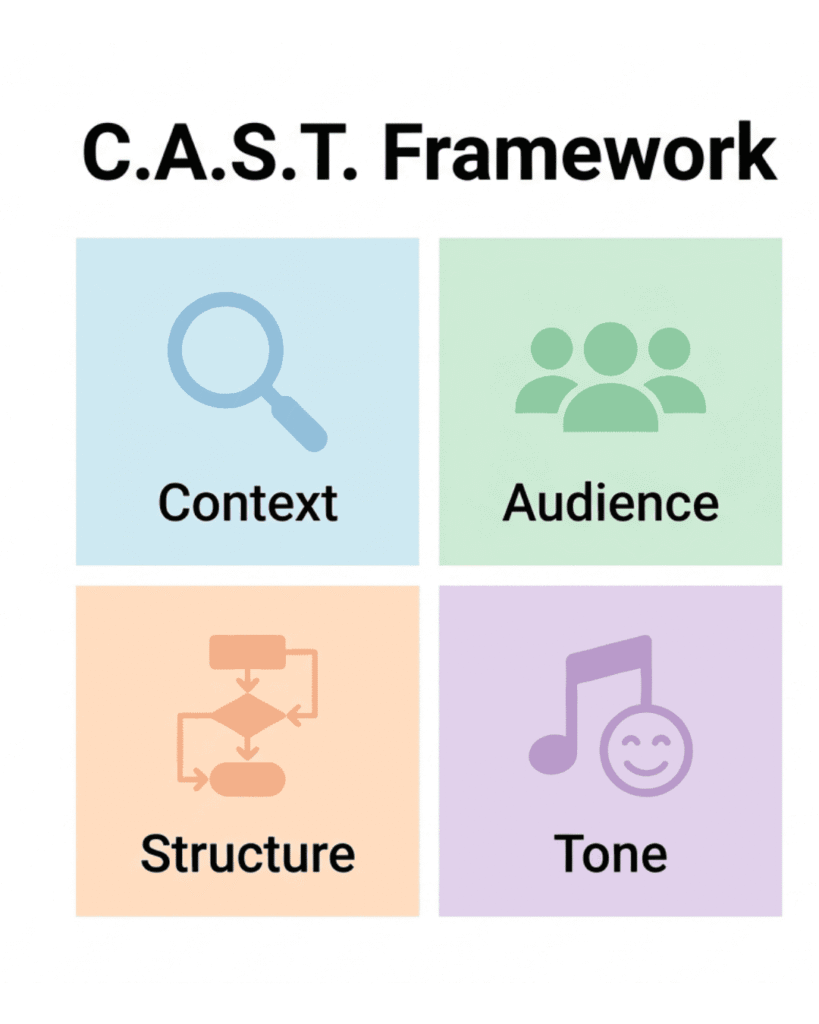
- C — Context (what’s the documentary about?)
- A — Audience (who’s watching?)
- S — Structure (how should it flow?)
- T — Tone (what feeling do you want?)
Here’s what that looks like in practice:
CONTEXT: Documentary about the 1980 eruption of Mount St. Helens, focusing on the geologists who predicted it but couldn’t get authorities to listen.
AUDIENCE: Curious adults who love disaster history and untold stories. They watch channels like Real Engineering and Fascinating Horror.
STRUCTURE: Cold open with eruption footage → introduce the overlooked geologists → timeline of warning signs → the tragic reasons warnings were ignored → aftermath and lessons learned
TONE: Respectful, suspenseful, slightly somber. Educational but never dry. Think “slow-burn mystery” more than “textbook lecture.”
That prompt alone will generate better scripts than 90% of what YouTubers are getting. But we’re going deeper.
5 Specific AI copy-paste Prompts for YouTube Documentary Scripts (That Actually Work)
Prompt #1: The Narrative Hook Generator
You’re a documentary scriptwriter for YouTube. My documentary is about [TOPIC].
Write 5 different opening hooks (30 seconds each) that grab attention immediately.
Avoid: “since the dawn of time” openings, generic statements, or slow setups.
Each hook must: – Start in the middle of action or tension
– Pose a specific, intriguing question
– Hint at why this story matters today
Format each hook as a short paragraph I could read directly as voiceover.
Why this works: Most documentaries fail in the first 15 seconds. This prompt forces interesting, specific openings instead of a boring setup.
Prompt #2: The “Show, Don’t Tell” Narration
Convert this factual information into vivid, cinematic narration for a YouTube documentary:
[PASTE YOUR RESEARCH NOTES HERE]
Rules:
– Replace abstract statements with sensory details (what would viewers SEE, HEAR, or FEEL?)
– Use active voice only
– Vary sentence length (mix short punchy lines with longer descriptive ones)
– Add one rhetorical question per paragraph
– End each section with a “cliffhanger” line that makes viewers want to keep watching
Topic tone: [SUSPENSEFUL / INSPIRING / MYSTERIOUS / REVERENT]
Real example of the difference:
Boring: “The factory employed 2,000 workers before it closed.”
After this prompt: “Listen closely. That silence? It wasn’t always here. Twenty years ago, 2,000 voices filled this floor. Machines sang. Boots echoed. Coffee cups clinked on metal desks. Now? Nothing but dust and the drip of a leaky roof.”
See the difference?
Prompt #3: The B-Roll & Visual Direction Script
I’m creating a documentary about [TOPIC]. For the following narration, suggest specific B-roll footage, archival photos, animations, or recreations:
[NARRATION TEXT HERE]
For each 15-second segment, provide:
– What the viewer sees (specific, not generic like “people working”)
– Camera suggestion (wide shot, close-up, slow zoom, drone, etc.)
– Mood or lighting notes
– One transition idea to the next scene
Also, flag any moments where I should consider a simple animation or text overlay instead of footage.
This prompt is gold for creators who struggle with the visual side of documentaries. It turns your script into a shot list automatically.
Read Top Faceless YouTube Channel Ideas to Start Today
Prompt #4: The Voiceover Pacing & Emphasis Guide
Review this documentary narration and add pacing notes:
[NARRATION HERE]
Add markers for:
– [PAUSE 2 SEC] — for dramatic moments
– [SLOW DOWN] — for important facts
– [SOFTER] — for emotional or respectful sections
– [BUILD ENERGY] — for tension or excitement
– **bold** words that need emphasis
Also, suggest where the background music should swell, drop out completely, or shift tone.
Most creators ignore pacing. That’s a mistake. A great script delivered with flat pacing is a boring video. This prompt turns your script into a performance guide.
Prompt #5: The Transition & Scene Change Writer
My documentary has these segments: [SEGMENT 1 TOPIC] → [SEGMENT 2 TOPIC] → [SEGMENT 3 TOPIC]
Write 3 different transition scripts for each gap. Each transition should be 5-10 seconds maximum.
Transition styles to include:
1. Question-based (“But what happened next?”)
2. Contrast-based (“While one group celebrated, another was quietly preparing…”)
3. Timeline-based (“Three weeks earlier…”)
Avoid: “meanwhile,” “additionally,” or any word that feels like a PowerPoint slide.
Step-by-Step: My Actual Workflow for Scripting with AI
Let me walk you through exactly how I use these prompts in real life.
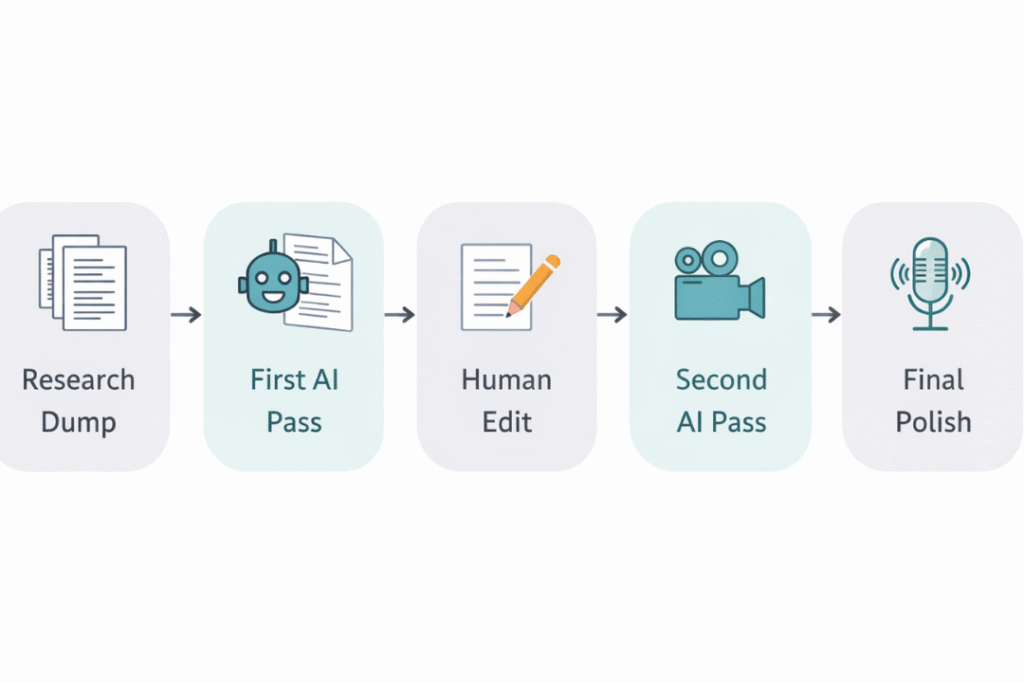
- Step 1: Research dump (30 minutes): I gather articles, videos, Wikipedia pages, and my own notes. I don’t organize them yet. I just collect.
- Step 2: First AI pass with Prompt #2 (15 minutes)I paste my messy research into Prompt #2 and let AI turn it into rough narration. This is never perfect — but it gives me something to work with instead of a blank page.
- Step 3: Human edit for accuracy and voice (1 hour): Here’s the non-negotiable step: I fact-check everything. AI hallucinates. I’ve caught it inventing quotes, dates, and even people. You must verify.
- I also rewrite anything that doesn’t sound like me. Your audience watches for YOU, not ChatGPT. Keep your personality.
- Step 4: Second AI pass with Prompt #3 for visuals (20 minutes): I run my edited narration through the B-roll prompt to generate shot ideas. This saves me hours of staring at stock footage sites.
- Step 5: Final polish with Prompt #4 for pacing (15 minutes): I add all the performance notes. When I record voiceover, I follow these like sheet music.
Total time: About 2.5 hours for a solid first draft. Without AI, this took me 6-8 hours easily.
Real-World Examples (Before & After)
Example 1: History Documentary
Original human-written line (that I was unhappy with): “The Roman Empire fell because of economic problems and military defeats.”
After AI prompt refinement: “Picture Rome, 476 AD, the treasury is empty. The army hasn’t been paid in months. And on the horizon? A barbarian army that knows exactly how weak the empire has become. This isn’t a sudden collapse. It’s a slow bleed — and by the time anyone noticed, it was too late.”
Same information. Completely different emotional impact.
Example 2: True Crime Documentary
Original: “The detective found three pieces of evidence at the scene.”
After AI prompt: “Detective Martinez kneels down. His flashlight catches something small. A button. Then another, six feet away. And there — a footprint that doesn’t match anyone who lives here. Three pieces. That’s all he has. But sometimes, three pieces are enough to solve a puzzle.”
7 Common Mistakes YouTubers Make with AI Documentary Prompts
I’ve made every single one of these. Learn from my embarrassment.
- 1. Asking for “a complete script” in one prompt, AI gets overwhelmed and produces generic sludge. Break your documentary into 3-5 segments. Prompt for each separately.
- 2. Never fact-checking. Seriously. AI will confidently tell you that Abraham Lincoln invented the airplane. Verify everything.
- 3. Using the same tone for every section. Your intro needs energy. Your emotional moments need restraint. Your conclusion needs reflection. Adjust prompts for each section’s unique tone.
- 4. Ignoring the visual side, a documentary script isn’t just words — it’s a blueprint for video. Always prompt for B-roll and visual suggestions.
- 5. Keeping AI’s first draft. The first draft is a starting point, not a finished product. Edit, rewrite, personalize.
- 6. Forgetting your audience, generic prompts produce generic scripts. Remind the AI who’s watching and what they already know.
- 7. Not saving your best prompts. When you write a prompt that works perfectly, save it in a document. I have a library of 30+ prompts now. Each video gets easier.
Tips & Best Practices From Someone Who’s Done This 40+ Times
- Start with a “skeleton prompt” first – Before writing anything, prompt: “Create a 7-section outline for a YouTube documentary about [TOPIC].” Get the structure approved before you write a single narration line.
- Use temperature settings if you have them – In tools like Claude or ChatGPT’s API, lower temperature (0.3-0.5) for factual narration. Higher temperature (0.7-0.9) for creative hooks and transitions.
- Create a “voice reference” document – Write a 200-word sample of YOUR writing voice. Paste this into every prompt as an example. The AI will mimic your style much better.
- Prompt for alternative angles – After your first script, ask: “Rewrite this from the perspective of someone who disagrees with my main point.” This finds blind spots and strengthens your actual argument.
- Name your documentary’s “competitor” – Tell the AI: “Write like a blend of [Channel A] and [Channel B].” It understands style references surprisingly well.
Frequently Asked Questions
Can AI write a complete YouTube documentary script from scratch?
Yes, but honestly? You don’t want that. AI-written scripts without human editing feel flat, generic, and often contain factual errors. The best approach is using AI for research organization, structure, and first drafts — then heavily editing with your unique voice and fact-checking.
Which AI tool is best for documentary scriptwriting?
For long-form documentaries, I prefer Claude (handles 100k+ tokens, great at maintaining tone) or ChatGPT with GPT-4. For research-heavy scripts, Perplexity AI is excellent because it cites sources. Free tools like Google Gemini work but require more prompt refinement.
How do I make AI-generated scripts sound less robotic?
Three fixes: (1) Add specific pacing notes to your prompts, (2) Feed the AI examples of your own writing first, and (3) Always rewrite the first and last sentences of every paragraph yourself — those are where AI sounds most artificial.
Will YouTube penalize AI-generated documentary scripts?
YouTube’s policy focuses on value, not tools. If your documentary is well-researched, original, and engaging — regardless of how you wrote the script — you’re fine. The problem is low-effort AI content with no human insight. Add your analysis, your perspective, your emotional take. That’s what matters.
How do I avoid AI hallucinations in documentary scripts?
Never paste research without asking for sources. Better yet: Give the AI your verified research and say, “Only use the information I’ve provided.” For historical docs, ask for specific dates and cross-check every single one. I’ve caught AI inventing entire events twice.
Can I use AI prompts for documentaries in languages other than English?
Absolutely. Most major AI tools work well in Spanish, French, German, Portuguese, Japanese, and Chinese. The key is providing examples of good documentary narration in your target language first. And always have a native speaker review — AI translation still has subtle awkwardness.
AI Won’t Replace You (But It Will Replace Someone Who Ignores It)
Here’s what I want you to remember.
AI prompts for YouTube documentary scripts are not magic. They won’t turn you into Ken Burns overnight. But they will handle the grunt work — the awkward phrasing, the transition block, the “how do I say this differently” frustration — so you can focus on what actually matters.
The story. The emotion. The unique perspective only you have.
Start with the C.A.S.T. framework I shared. Use the five prompts. Make the mistakes (you will anyway — we all do). But keep going.
Because here’s the truth I’ve learned after 40 documentaries: Viewers don’t care how you wrote the script. They care if you made them feel something.
AI can help you write faster. Only you can make it matter.



The C.A.S.T. framework is genuinely useful — I’ve seen the same problem where people just type “write a script” and get bland results. Breaking it down by context, audience, structure, and tone makes a real difference. The Mount St. Helens example is a great illustration of how specific you need to be. I’d add that feeding the AI a few reference lines from documentaries you admire helps too. Appreciate the practical angle here, not just generic advice.
The C.A.S.T. breakdown makes so much sense — I used to just type “write a script” and got exactly what I deserved: generic filler. Once I started giving AI more context and tone direction, the drafts got noticeably better. I’ve also been using deepai for structuring narration and brainstorming B-roll ideas, and it’s been a solid workflow for staying consistent. Definitely agree the prompt is the real skill here.