
AI Prompts Website Health Check: Complete Guide to Auditing Your Website Using AI (2026)

If you own a website, blog, eCommerce store, or landing page, regularly checking your website’s health is essential. A slow, poorly optimized, or confusing website can reduce traffic, hurt rankings, and lower conversions.
This is where an AI Prompts Website Health Check becomes useful.
Instead of manually auditing every part of your site, you can use AI tools like ChatGPT, Gemini, or Claude with smart prompts to quickly identify problems related to SEO, performance, content quality, user experience, and conversion optimization.
In this guide, you’ll learn how to perform a complete website health check using AI prompts, even if you are a beginner.
What Is an AI Prompts Website Health Check?
An AI prompts website health check is the process of using carefully written prompts with AI tools to analyze your website and uncover issues.
These prompts help AI evaluate:
- Website speed
- SEO structure
- Mobile responsiveness
- User experience
- Content quality
- Conversion funnels
- Technical issues
- Branding consistency
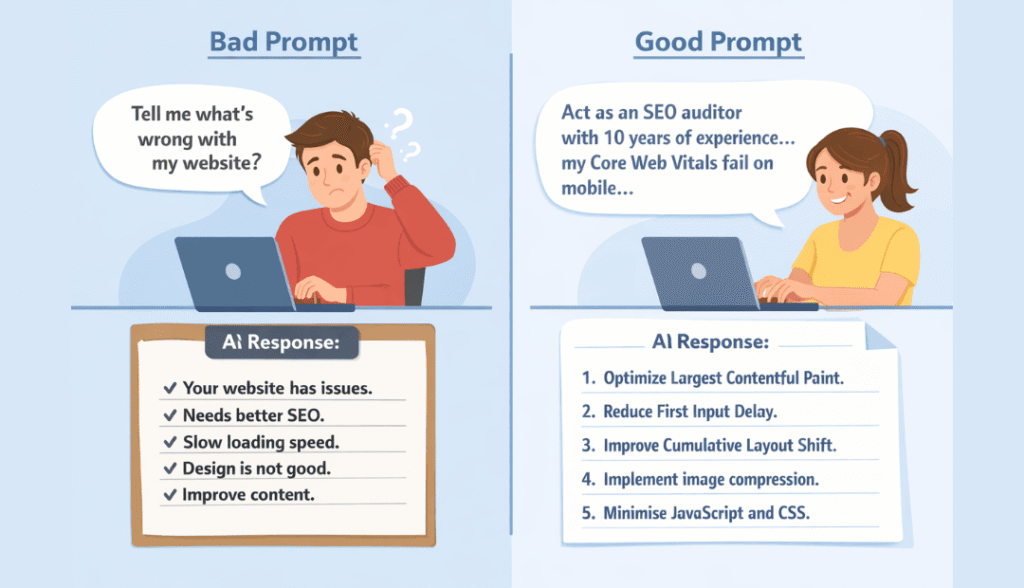
Bad prompt (don’t use this): “Tell me what’s wrong with my website.”
Good prompt (use this): “Act as an SEO auditor with 10 years of experience. I run a food blog with 200 recipes. My Core Web Vitals scores are failing on mobile, specifically Largest Contentful Paint at 4.2 seconds. Based on this issue, give me a prioritized 5-item fix list with specific WordPress plugin recommendations and estimated time to implement each fix.”
See the difference? One gets you a paragraph of fluff. The other gets you an actionable plan.

Why Website Health Checks Matter
Many website owners focus only on publishing content or running ads. But they forget one important thing:
A broken website cannot perform well.
Even small issues can create major problems:
- Slow loading → higher bounce rate
- Poor mobile design → lost users
- Weak CTAs → fewer sales
- Thin content → lower Google rankings
- Broken links → poor user trust
Regular health checks help you catch these problems before they damage performance.
Why Use AI for Website Audits?
Traditional website audits require:
- SEO tools
- Technical knowledge
- Hours of manual analysis
AI makes this easier.
Benefits of AI website audits:
Faster Analysis
AI can review content and structure within minutes.
Beginner Friendly
You don’t need deep technical knowledge.
Cost Effective
Useful if you cannot hire SEO consultants.
Better Decision Making
AI helps prioritize which problems matter most.
However, AI works best when combined with real tools like:
- Google Search Console
- PageSpeed Insights
- Analytics
AI gives interpretation; tools provide raw data.
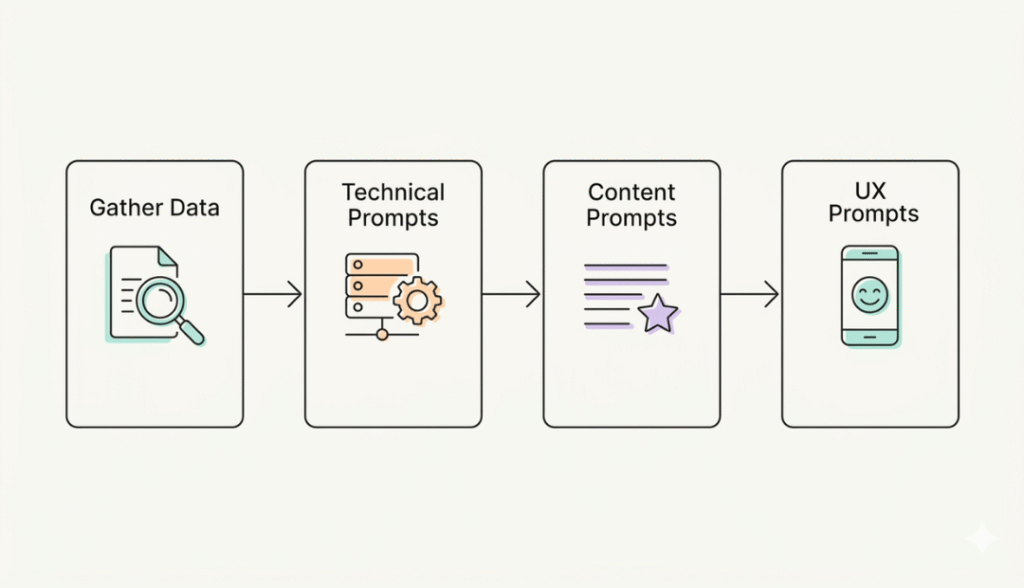
Step 1: Gather Your Raw Data First
AI is only as good as the information you feed it. Before writing a single prompt, collect these items:
- Your Google Search Console data (last 3 months)
- A recent PageSpeed Insights report (mobile + desktop)
- Your site’s XML sitemap
- A list of your top 20 landing pages by traffic
- Three competitor sites in your niche
Keep these in a document. You’ll reference them constantly.
Step 2: The Technical Foundation Prompts
Start with the boring stuff—because boring stuff kills rankings when it breaks.
Prompt 1: Server & Hosting Check
I run a [WordPress/Squarespace/Shopify] website at [your URL]. My average Time to First Byte (TTFB) from Google Search Console is [find this number]. Based on this TTFB, should I upgrade hosting, switch to a CDN, or optimize database queries? Give me specific diagnostic steps to isolate the root cause.
Prompt 2: Crawlability Audit
Act as a Googlebot crawler. Based on my sitemap at [your URL]/sitemap.xml, list 10 potential crawl issues I should check for, including orphaned pages, noindex tags accidentally applied, and robots.txt blocking. For each issue, give me the exact spot to look in my CMS or hosting panel.
Prompt 3: Indexation Health
My Search Console shows [X] indexed pages, but my CMS says I have [Y] published pages. List the six most common reasons for this discrepancy, from duplicate content to canonical tag errors. For each reason, provide a one-sentence fix I can implement today.
Step 3: Content Quality Prompts
This is where most AI prompts website health checks get lazy. Don’t just ask “Is my content good?”—get specific.
Prompt 4: Thin Content Detection
Here are my 10 lowest-traffic pages from Google Analytics: [paste URLs]. Analyze each URL pattern and categorize the thin content into three buckets: a) not enough words, b) not matching search intent, c) outdated information. For each bucket, give me a template prompt I can use to rewrite a page with AI assistance.
Prompt 5: Topic Gaps
I write about [your niche]. Here are my 5 top-performing competitors: [list URLs]. Analyze the topics they cover that I don’t. Create a table with three columns: Topic, Search Volume indicator (low/medium/high), and estimated effort to create. Only include topics with clear commercial or informational value—no filler.
Prompt 6: E-E-A-T Evaluation
Review my About page at [URL] and my author bios across the site. Using Google’s E-E-A-T guidelines (Experience, Expertise, Authoritativeness, Trustworthiness), score my site from 1-10 in each category. Then give me three specific content additions that would increase my Expertise score, such as citing sources, adding credentials, or showing hands-on experience.
Step 4: User Experience & Conversion Prompts
Technical fixes bring people to your site. UX keeps them there.
Prompt 6: E-E-A-T Evaluation
Here’s a text description of my homepage hero section: [describe what users see before scrolling]. Act as a conversion rate optimizer. Identify three psychological triggers I’m missing (urgency, social proof, clarity of value proposition) and rewrite my headline using each trigger. Keep each version under 10 words.
Prompt 8: Navigation Flow Analysis
My site structure is [describe your menu categories]. A user wants to [common goal, e.g., ‘find your pricing’ or ‘read your beginner guide’]. Map the minimum number of clicks from the homepage to the goal. Then suggest two structural changes that reduce clicks by at least 30%, such as consolidating categories or adding a utility navigation bar.
Prompt 9: Mobile Experience Check
List 7 mobile UX sins that commonly destroy conversion rates on phones, such as tiny tap targets or horizontal scroll. For each sin, give me a 10-second test I can perform on my phone right now to see if my site commits that sin. Include exactly where to look on the page.
Real-Life Use Case: How One Health Check Uncovered a $12k Problem
Let me tell you about a client—let’s call her Sarah.
Sarah ran an e-commerce store selling handmade leather goods. Traffic was steady at 15,000 monthly visitors, but sales had flatlined for six months.
We ran an AI prompts website health check using the framework above. Here’s what we found:
The Technical Prompt revealed that her TTFB jumped from 300ms to 1.8 seconds after a recent plugin update. That delay alone cost her an estimated 15% in conversions.
The Content Prompt showed 40% of her product descriptions were under 50 words—thin content that Google was actively deprioritizing.
The UX Prompt uncovered that her checkout button was above the fold on desktop but required scrolling on mobile. Mobile represented 68% of her traffic.
We fixed all three issues in one week. The result? $12,000 in additional sales the following month.
Sarah wasn’t unlucky. She just didn’t know what questions to ask.
Tips & Best Practices for Your AI Prompts Website Health Check
After running hundreds of these audits, here’s what separates effective health checks from wasted time:
Always Add Constraints
- Bad: “How do I improve site speed?”
Good: “How do I improve site speed with a $50 monthly budget and no developer access?”
AI performs better with boundaries. Always include your platform, budget, skill level, and available tools.
Use Role Prompting
- Start every health check prompt with: “Act as an [expert role] with [X years] experience in [specific industry].”
- This changes the depth and quality of answers dramatically. Compare “review my SEO” versus “act as a technical SEO who has fixed 200+ Core Web Vitals failures”—the second one gives you specific technical advice, the first one never will.
Chain Your Prompts
Don’t try to solve everything in one prompt. Start broad, then get specific based on the AI’s response. Chain example:
- “Give me 10 potential health issues for a recipe blog.”
- “Of those 10, which 3 are most likely given my average time-on-page is 45 seconds?”
- “For issue #2 (slow recipe card loading), give me exact HTML structure changes to fix it.”
Keep a Prompt Library
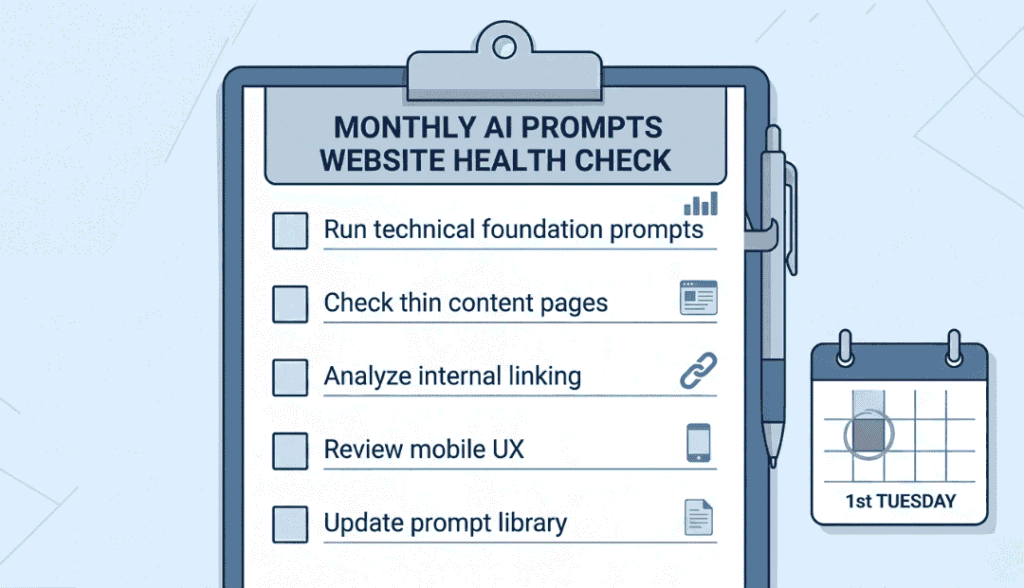
You’ll reuse the same health check prompts monthly. Save them in a document. I have a Google Doc with 47 prompts organized by category (technical, content, UX, backlinks). Steal this habit.
Validate Everything
- AI hallucinates. It will confidently tell you to “check your htaccess file” even if you’re on Squarespace (which doesn’t use htaccess).
- Always follow up with: “Confirm that this solution works for [your platform]. If not, what’s the equivalent fix?”
Common Mistakes to Avoid (I’ve Made All of These)
- Asking Open-Ended Questions: “What’s wrong with my website?” is useless. AI doesn’t know your site. It will give you generic checklist items you could find on any blog.
- Fix: Always provide data—actual numbers from Google Search Console, PageSpeed Insights, or analytics.
- Ignoring the Context Window: ChatGPT and Claude forget what you said after about 4,000-8,000 words. If your health check is comprehensive, break it into separate conversations: one for technical, one for content, one for UX.
- Taking Implementation Advice as Gospel: AI is excellent at strategy. It’s mediocre at specific implementation for your unique setup. Always verify plugin recommendations, code snippets, and platform-specific advice against official documentation.
- Running a Health Check Once: Website health degrades constantly. New plugins conflict. Content goes stale. Google updates algorithms. Run this audit monthly. I schedule mine for the first Tuesday of every month—it’s on my calendar with a 90-minute block.
- Forgetting About Internal Linking: Most health checks ignore internal link structure entirely. This is crazy—internal links are one of the highest-ROI fixes you can make.
- Add this prompt: “Analyze my internal linking for [your top 10 important pages]. Identify 3 pages that receive fewer than 3 internal links but deserve more based on their topic relevance. For each, suggest 5 existing pages where I should add a contextual link.”
When Should You Run a Full Health Check?
Beyond the monthly audit, trigger a full AI prompts website health check when:
- Traffic drops more than 15% month-over-month without an obvious reason (seasonality, major algorithm update)
- You’re launching a major redesign or migration—audit before AND after
- You haven’t updated plugins or themes in over 3 months—technical debt accumulates silently
- Your bounce rate increases by 10+ percentage points on any key landing page
- You receive user complaints about anything breaking, loading slowly, or being hard to find
Don’t wait for a crisis. The best time to run a health check was three months ago. The second-best time is today.
Frequently Asked Questions
Can an AI-prompted website health check completely replace paid SEO tools like Ahrefs or Semrush?
No, and don’t let anyone tell you otherwise. AI prompts are fantastic for interpretation, prioritization, and generating action plans. But you still need crawl data, backlink analysis, and keyword research from dedicated tools. Think of AI as your analyst—the tools still provide the raw data.
How long should a thorough AI-prompts website health check take for a typical 50-page site?
Plan for 90-120 minutes for your first time. You’ll spend 30 minutes gathering data, 45 minutes writing and refining prompts, and 30 minutes reviewing AI responses and creating your action plan. After you build your prompt library, cut that to 60 minutes monthly.
Which AI tool works best for website health checks—ChatGPT, Claude, or Perplexity?
For technical health checks, Claude 3.5 Sonnet is currently the best—it handles larger context windows (100K+ tokens) so you can paste full audit reports. For quick brainstorming and shorter prompts, ChatGPT-4 is fine. Perplexity excels when you need citations and current information, like checking recent Google algorithm changes.
Will running an AI prompts website health check help with Google AdSense approval?
Indirectly, yes. AdSense reviewers look for sites with good user experience, unique content, clear navigation, and technical stability. A proper health check identifies exactly where your site falls short on these criteria. Fix those issues, and you dramatically improve approval odds.
How often should I update my health check prompts as Google updates its algorithms?
Review your prompts quarterly. After major updates (like the March 2024 Core Update or HCU), add a specific prompt: “Given Google’s [name] update from [date], what new health check items should I add to my audit for [your niche]?” AI tools stay current on algorithm changes better than most humans do.
Bringing It All Together
Look—I get it. Website maintenance feels endless. There’s always something else to fix, another update to run, another metric to monitor.
But here’s what I’ve learned after years of doing this: the sites that win aren’t the ones with unlimited budgets or giant teams. They’re the ones who ask better questions.
An AI prompts website health check isn’t magic. It won’t instantly double your traffic or fix a fundamentally broken business model.
What it will do is show you exactly where to look when something feels wrong. It will turn vague anxiety (“my site isn’t performing”) into specific action (“fix the meta descriptions on these 12 pages and add internal links to these 5”).
Start small. Run the technical prompts this week. Next week, tackle content. The week after, user experience.
By the end of the month, you’ll have a healthier website and—more importantly—a repeatable system for keeping it that way.
Now go ask some better questions.


Useful guide. The comparison between the vague and the detailed prompt really shows how